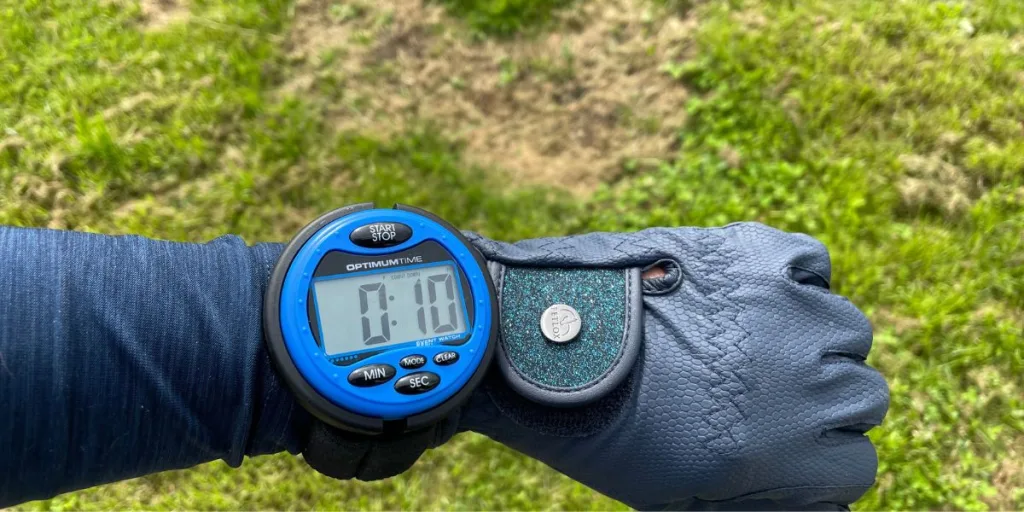
For many years wearing a stopwatch XC was only allowed at Novice level and above but in 2017 British Eventing changed the rules to allow those of us competing at BE100 and below to wear a watch.
As I’ve already mentioned in a previous blog ‘If you aren’t winning, you’re learning’ I’ve always been a firm believer that I didn’t need to wear a stopwatch to go XC at the lower levels because I should be able to learn to ride with the feel for the correct speed and rhythm.
It also boils my blood when I see (mostly young!) riders whizzing round the XC too fast, checking their watch and then trotting over the finish line. That is NOT how to do it…!
But the reality is the sport has changed massively since I first started out many years ago! Back then we came straight out at BE100 or Pre-Novice as it was called and we didn’t have all of the amazing Championship opportunities British Eventing now offer at BE80, 90 & 100 level. Getting a ticket to one of these prestigious Championship events is a huge achievement for us grassroots riders and the qualifying classes are hugely competitive…. every second really does count.
So after a conversation with my coach that I should probably start riding with a stopwatch I duly went out and purchased one at Badminton Horse Trials. Splash had unfortunately tweaked a suspensory branch and needed six weeks off so my watch has been sitting at home in the cupboard until this weekend when I finally got the chance to use it at Forgandenny horse trials.
So where do you start when it comes to using a stopwatch?
My previous experience of stopwatches was back in the old days when we still had the roads and tracks and steeplechase and my rider would wheel the course to work out where the minute markers were. Clearly people don’t do that at the one day events especially at BE90 so I needed to do some research… thank god for Google!
Here’s what I found out….
There is a fantastic app called CrossCountry App that lets you download your XC course before you walk it or record your own course walk using GPS.
The events upload the map and photos of each XC track with the minute markers already mapped out for you. This is probably the simplest way to do it for the first few times that you use a watch. Depending on whether you want your watch to count down or count up (more on this in a bit) you chose the setting on your app and then start walking the course as you normally would. As you approach each minute market your phone will beep at you to let you know where the marker is. I just made a note on my phone but they are also marked on the map as well.
If as you get more experienced, you want to record your own course using the GPS feature you input the level, speed (BE90 is 450m/min) and the optimum time which is usually made available at the secretary’s tent once the course has been inspected and is open for walking. If you don’t have this before you walk the course don’t worry because you can input this later and the app will adjust your minute markers.
As you walk you add in each jump, you can take photos, make notes of strides or pause it to re-walk different lines. When you press finish the app will automatically calculate where your minute markers are and put them onto the map for you.
Whilst recording your own course is a more complicated it allows you to walk your own lines, so if you know your horse will need to take slightly wider turns into some fences you can factor this into your timings.
* Top Tip *
If there is limited mobile reception at the event I would definitely recommend downloading the map of the course before you go.
Setting up your watch
Spend some time at home playing with the different settings and make sure you are familiar with how it all works. My watch has three main modes, a normal clock so you can keep track of how long you have left before your time, a count up mode and a count down mode.
When you are out on course you can set the watch to either count up from zero to the optimum time or count down. I found it easier to keep track of the minutes by having the watch counting up from zero to the optimum time of 5.31 but everyone will be slightly different.
One of the things I was really worried about was pressing the start button as I was being counted down and hopefully flying out of the start box! This is where the watch is brilliant because it has a programme that lets you start it as the starter is counting you down and then it immediately starts again counting up to the optimum time. So I set it to count down from 10 seconds which let me press the start button as the XC starter was counting down from 10 seconds and then I didn’t have to worry about it again because it automatically started counting up as we left the start box. If you have a tricky horse to get into the start box you could set it for when you are given your 1 minute warning by the starter and then all you have to worry about is getting in that start box!
So did it help me ride at a more even pace around the whole course?
I think it would be fair to say yes, it did. I was bang on my minute markers up to the three minute mark and then just slightly behind at the four minute marker. This was the section of the course that I knew would be slightly slower and normally I would have been able to make up the time in the last minute and a half. However, I did feel that Splash was just getting a bit tired, the time he had off had obviously had a bit more of an impact than I realised, and I felt him take a big breath and just feel a bit flat. So I made the decision not to keep pressing him, let him get his breath back and we ended up coming home nine seconds over the optimum time.
And that is perhaps the most important part of the blog – is not riding to your watch – but riding what is underneath you. For me my horse is more important than a higher placing and I want him to love his job as much as I do.
Hopefully this has been helpful if you are thinking about using a stopwatch for the first time. There are loads of useful resources out there to help, lots of friendly riders who will willingly share their own top tips and of course lots of experienced coaches to help and advise you with your training and competition prep.
Liz S x x
Photo Credit: Action Replay
* EquiTeam Top Tip *
Practice using your watch before the big day by setting out some markers in a field at home setting them out at the distance you need to travel per minute. This will give you an idea of what your canter should feel like – but remember to factor in the additional time in the air over a fence, and also the impact of undulating ground.